Packaging Your Work

You've built a working camera driver. It detects objects, tracks them, and publishes data to other nodes. Now what? How do you use it in another project? How do you share it with your team, or the wider robotics community?
The answer is packaging — bundling your code into a reusable unit with clear dependencies, version numbers, and metadata.
Why Packages Matter
Without packages, robotics projects quickly become unmaintainable:
- Copying code everywhere — you paste your camera driver into five different projects. A bug fix requires editing all five copies.
- Broken dependencies — your code uses OpenCV 4.5, but someone else's uses 4.8. The APIs changed. Nothing works.
- No version history — you update the driver, and suddenly three other projects break. No way to roll back.
Packages solve this by making code reusable, versioned, and declarative about what it needs.
What's In a Package?
A typical robotics package contains:
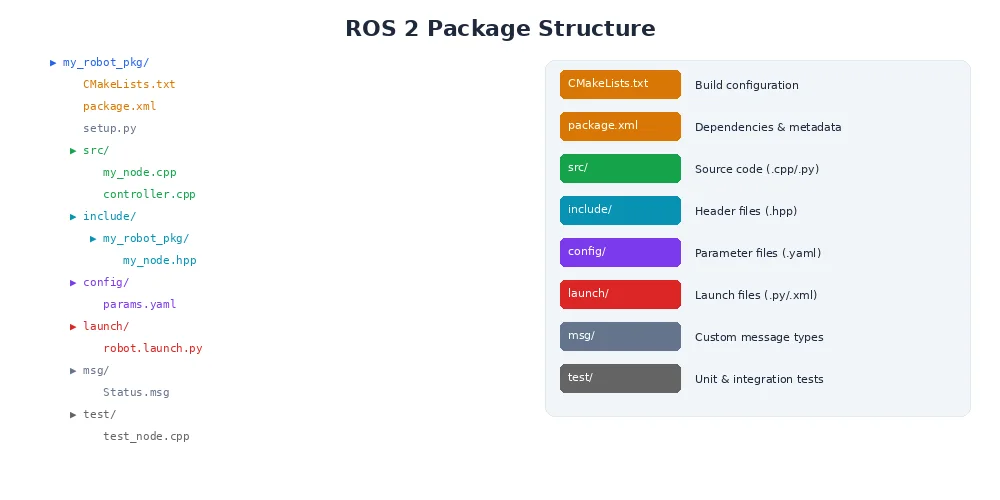
The package.xml (or Cargo.toml for Rust, package.json for Node.js) is the key file:
<?xml version="1.0"?>
<package format="3">
  <name>my_camera_driver</name>
  <version>1.2.3</version>
  <description>USB camera driver with object detection</description>
  <maintainer email="you@example.com">Your Name</maintainer>
  <license>MIT</license>

  <!-- Build dependencies -->
  <depend>opencv</depend>
  <depend>robot_msgs</depend>
  <depend>robot_middleware</depend>

  <!-- Test dependencies -->
  <test_depend>pytest</test_depend>
</package>
This tells the build system:
- What this package is and who maintains it
- What version it is (more on this below)
- What other packages it needs to compile and run
- What license applies (important for open-source)
Always specify exact version ranges for dependencies. opencv >=4.5.0, <5.0.0 is safer than just opencv — you avoid breaking changes in major version bumps.
Semantic Versioning
Version numbers aren't random. Most robotics software follows semantic versioning (semver):
MAJOR.MINOR.PATCH
1 . 2 . 3- MAJOR — breaking changes (users must update their code)
- MINOR — new features, backward-compatible
- PATCH — bug fixes, backward-compatible
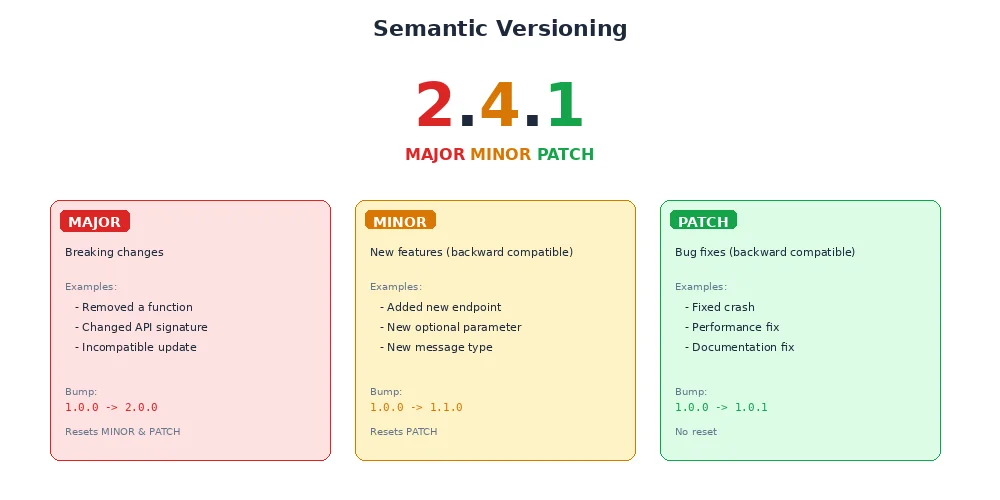
Example:
1.0.0→1.0.1— bug fix, safe to upgrade1.0.1→1.1.0— new feature added, safe to upgrade1.1.0→2.0.0— API changed, might break your code
This lets dependency managers make smart decisions. If you depend on my_camera_driver ^1.2.0, you'll accept 1.2.3 and 1.9.0, but not 2.0.0.
Version 0.x.y means "still experimental." Breaking changes can happen in minor versions. Once you hit 1.0.0, you're committing to stability.
Dependency Management
Good dependency management prevents "dependency hell" — where packages need incompatible versions of the same library.
[dependencies]
opencv = "0.88"             # Accept 0.88.x
serde = { version = "1.0", features = ["derive"] }
tokio = { version = "1.35", default-features = false }

[dev-dependencies]           # Only needed for testing
mockall = "0.12"

[build-dependencies]         # Only needed during build
cc = "1.0"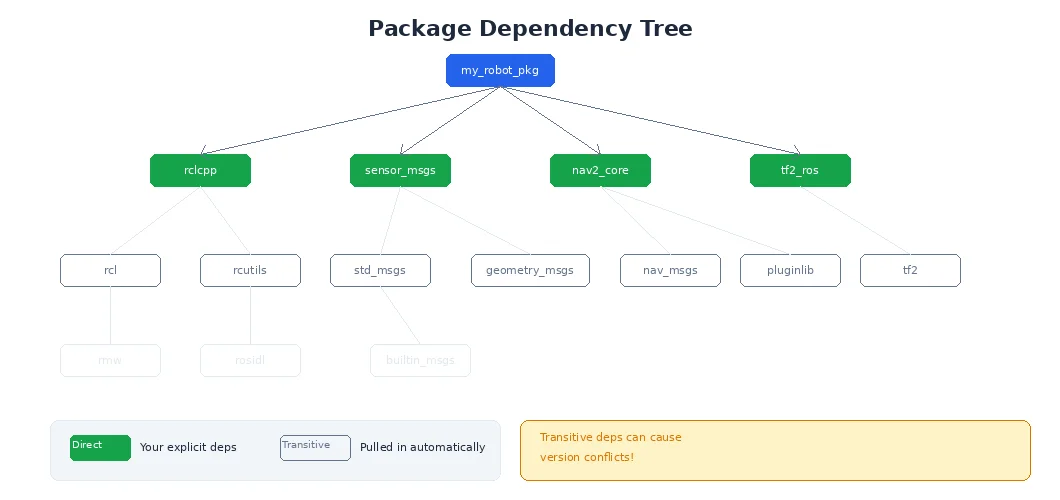
Package managers (like Cargo, npm, pip) resolve dependencies automatically:
- They find versions that satisfy all constraints
- They download and cache packages locally
- They generate a lock file (e.g.,
Cargo.lock) that records exact versions used — ensuring reproducible builds
Always commit your lock file to version control. It ensures everyone on your team builds with the exact same dependency versions, avoiding "works on my machine" bugs.
What's Next?
You've packaged your code. But how do you configure it for different robots and environments? How do you launch multiple nodes at once? In the next lesson, we'll explore configuration and launch systems — the glue that holds multi-node robot systems together.