Deployment
Your code works perfectly on your laptop. Ubuntu 22.04, x86-64, all the right libraries installed. But your robot runs:
- ARM processor (not x86)
- Embedded Linux (not full Ubuntu)
- Limited storage (8GB, not 500GB)
- No keyboard, mouse, or monitor
How do you get your software from development machine to robot?
The Deployment Challenge
Robotics deployment is harder than web deployment:
| Challenge | Web Apps | Robots |
|---|---|---|
| Platform | Same CPU everywhere (x86 cloud servers) | Different CPUs (ARM, RISC-V, custom SoCs) |
| Connectivity | Always online | Often offline, intermittent network |
| Updates | Deploy instantly, rollback if needed | Update takes time, rollback is risky |
| Testing | Test in staging environment | Can't easily test on real hardware |
| Failure cost | Website is down | Robot is stranded/broken |
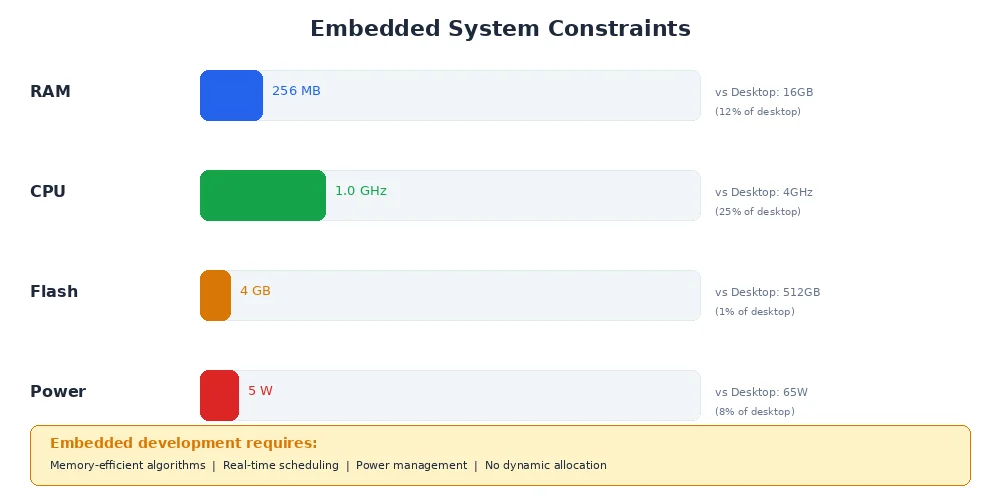
We need deployment strategies that handle these constraints.
Cross-Compilation
Your laptop is x86-64. Your robot is ARM. You can't just copy the executable.
Cross-compilation means building code on one architecture to run on another.
# Add ARM target to Rust toolchain
rustup target add aarch64-unknown-linux-gnu

# Install ARM linker
sudo apt install gcc-aarch64-linux-gnu

# Build for ARM
cargo build --release --target aarch64-unknown-linux-gnu

# Result: target/aarch64-unknown-linux-gnu/release/my_robot_node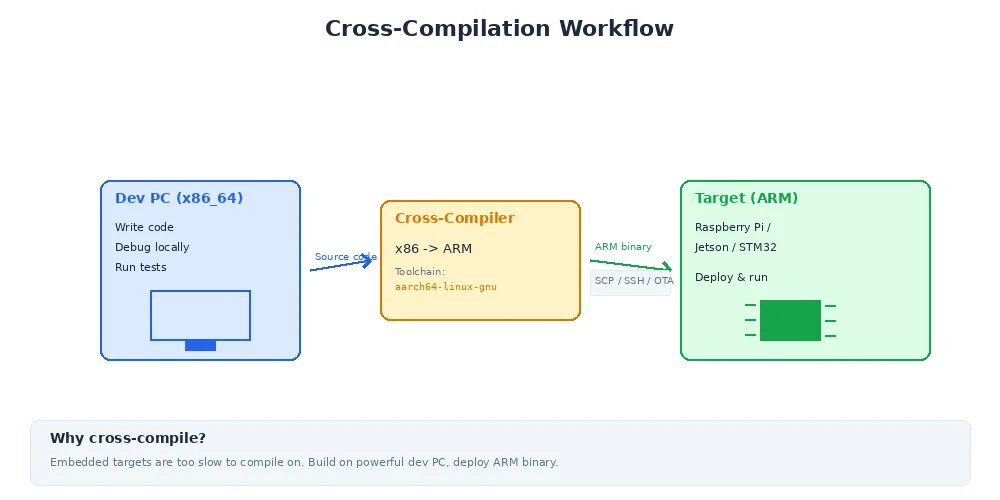
The compiled binary runs on ARM Linux, even though it was built on x86.
Some languages (like Python) are interpreted, so they don't need cross-compilation — Python bytecode runs anywhere. But native extensions (like OpenCV bindings) still need to be built for the target architecture.
Containers (Docker)
Instead of installing dependencies manually on each robot, package everything in a container.
FROM arm64v8/ubuntu:22.04

# Install system dependencies
RUN apt-get update && apt-get install -y \
    python3 \
    python3-pip \
    libopenCV-dev

# Copy application code
COPY ./my_robot_app /app
WORKDIR /app

# Install Python dependencies
RUN pip3 install -r requirements.txt

# Run the node
CMD ["python3", "camera_node.py"]
Build the container image:
docker build -t my_robot_app:1.2.3 -f Dockerfile.arm64 .Deploy to robot:
# Save image as tar file
docker save my_robot_app:1.2.3 > robot_app.tar

# Copy to robot (over SSH)
scp robot_app.tar robot@10.0.0.5:/tmp/

# Load on robot
ssh robot@10.0.0.5 "docker load < /tmp/robot_app.tar"

# Run container
ssh robot@10.0.0.5 "docker run -d --name camera my_robot_app:1.2.3"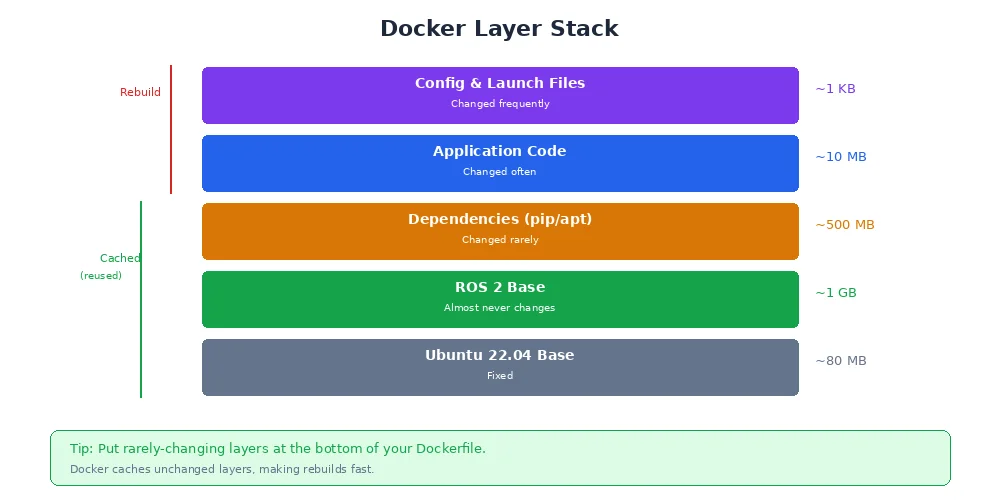
Benefits:
- Reproducible — same environment on every robot
- Isolated — dependencies don't conflict with system packages
- Portable — works on any robot with Docker installed
- Versioned — tag images like
1.2.3, easy rollback
Containers add overhead (storage, memory, startup time). For resource-constrained robots (like microcontrollers), you may need to deploy bare binaries instead. But for anything running Linux on ARM/x86, containers are worth it.
Over-the-Air (OTA) Updates
Manually SSHing into robots doesn't scale. For fleets of 10+ robots, you need over-the-air updates.
import requests
import subprocess

UPDATE_SERVER = "https://updates.myrobot.com"
CURRENT_VERSION = "1.2.3"

def check_for_updates():
    """Check if a new version is available"""
    r = requests.get(f"{UPDATE_SERVER}/latest")
    latest = r.json()["version"]
    return latest if latest != CURRENT_VERSION else None

def download_update(version):
    """Download new container image"""
    r = requests.get(f"{UPDATE_SERVER}/images/{version}.tar", stream=True)
    with open(f"/tmp/update-{version}.tar", "wb") as f:
        for chunk in r.iter_content(chunk_size=8192):
            f.write(chunk)

def apply_update(version):
    """Stop old container, load new one, start it"""
    subprocess.run(["docker", "stop", "camera"])
    subprocess.run(["docker", "load", "-i", f"/tmp/update-{version}.tar"])
    subprocess.run(["docker", "run", "-d", "--name", "camera",
                   f"my_robot_app:{version}"])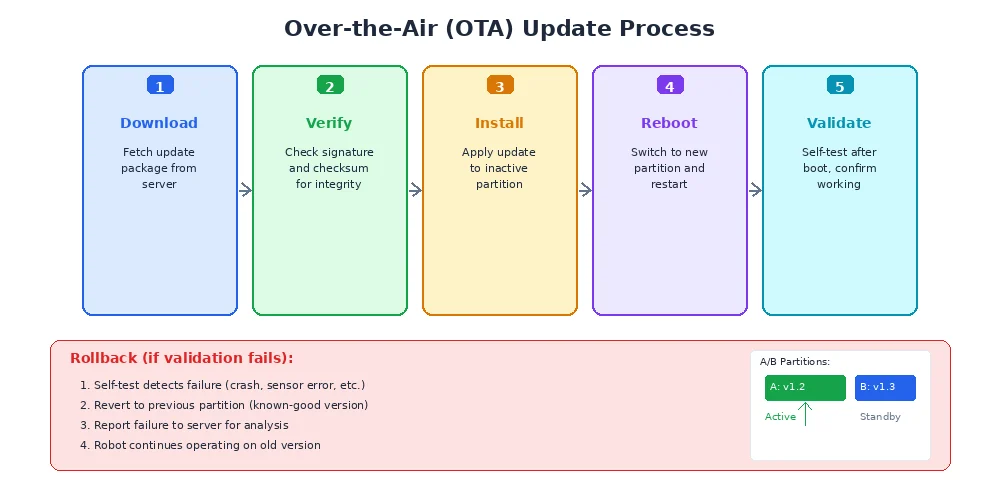
Production OTA systems also:
- Verify updates with cryptographic signatures (prevent malicious updates)
- Support incremental downloads (only download what changed)
- Roll back automatically if the new version crashes
- Schedule updates during idle time (not mid-mission)
Always keep a "known good" version on the robot. If an update fails, the robot should automatically revert. Never leave a robot in a bricked state where it can't boot.
Deployment Checklist
Before deploying to a real robot:
- ✅ Test in simulation — run full system tests
- ✅ Cross-compile — verify binary works on target architecture
- ✅ Test on a dev robot — deploy to one robot first, not the fleet
- ✅ Monitor health — check CPU, memory, disk usage after deploy
- ✅ Have a rollback plan — keep previous version ready
- ✅ Update documentation — record what changed and how to revert
What's Next?
You've built, tested, and deployed your robot software. But robotics is a collaborative field. In the final lesson, we'll explore contributing to open source — how to share your work, get feedback, and help build the robotics ecosystem.