Contributing to Open Source
Most robot software is built on open-source foundations: OpenCV, Gazebo, MoveIt, and many middleware frameworks. Thousands of developers contribute drivers, algorithms, and tools that everyone uses.
You've learned how to build robot software. Now let's explore how to give back — and why it matters.
Why Contribute?
Open source isn't just altruism. Contributing helps you:
- Learn faster — code reviews from experts teach you best practices
- Build credibility — public contributions are proof of your skills
- Shape tools you use — fix that annoying bug, add that missing feature
- Network — meet people working on cutting-edge robotics
- Help others — your camera driver might save someone else weeks of work
And for the ecosystem:
- Shared code means less duplication of effort
- More eyes on code means fewer bugs
- Diverse contributors lead to better, more robust software
Finding Projects to Contribute To
Where do you start?
1. Use What You Love
The best contributions come from fixing problems you actually encounter. If you use a library daily, you'll notice bugs, missing docs, or rough edges that others might miss.
2. Start Small
Don't jump into rewriting a path planner. Start with:
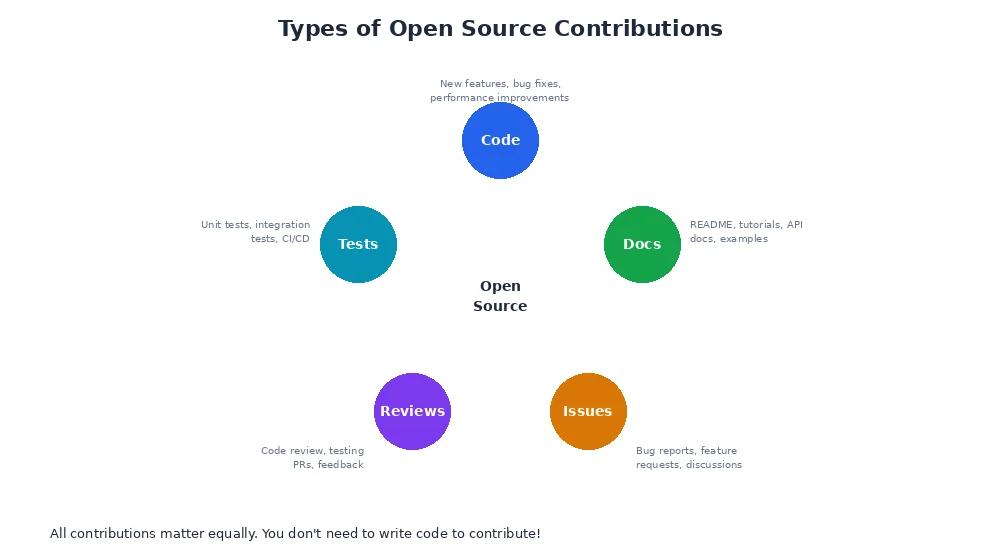
- Documentation — fix typos, clarify confusing sections, add examples
- Bug reports — file detailed issues with reproduction steps
- Tests — add test cases for uncovered edge cases
- Good first issues — many projects tag beginner-friendly tasks
3. Explore Popular Projects
Robotics has a rich open-source ecosystem:
| Project | What It Does | Good For |
|---|---|---|
| Gazebo | 3D simulator | Physics, rendering, sensors |
| MoveIt | Motion planning | Arm control, path planning |
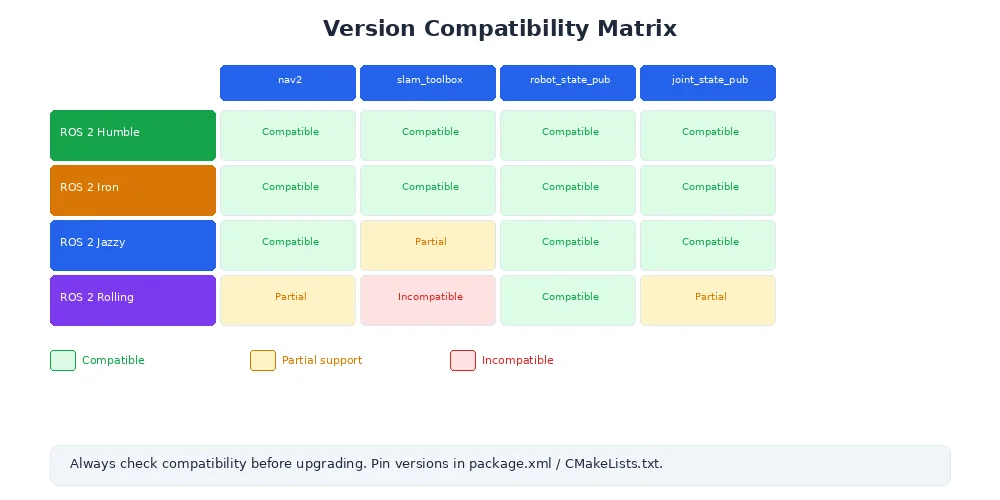
| Nav2 | Navigation stack | Mobile robot navigation |
| OpenCV | Computer vision | Image processing, algorithms |
| PCL | Point cloud library | LiDAR processing, 3D vision |
Check their GitHub repos for "good first issue" or "help wanted" labels.
Making Your First Pull Request
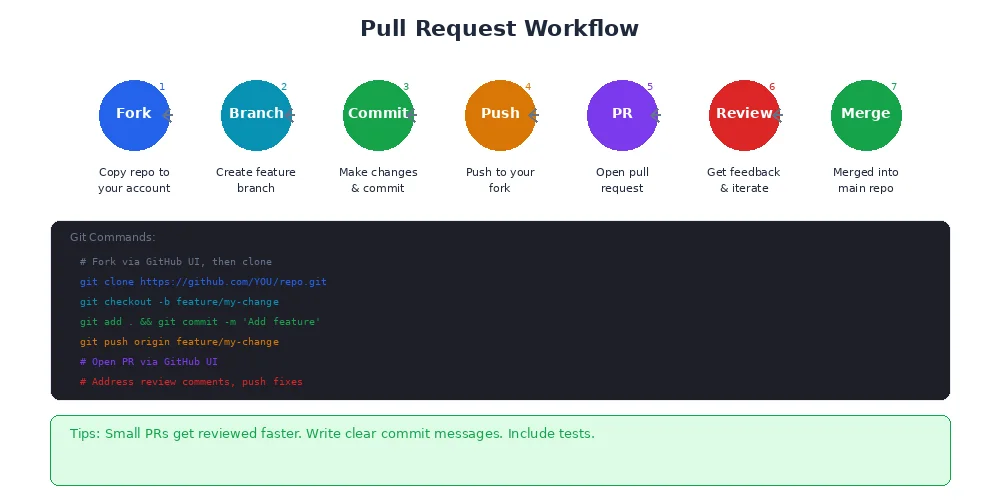
Here's the typical workflow:
1. Fork and Clone
# On GitHub, click "Fork" to create your own copy

# Clone your fork
git clone https://github.com/YOUR_USERNAME/project.git
cd project

# Add upstream remote (original repo)
git remote add upstream https://github.com/ORIGINAL_OWNER/project.git
2. Create a Branch
# Create and switch to a new branch
git checkout -b fix-camera-timestamp-bug

# Make your changes
# ... edit files ...

# Commit with a clear message
git add camera_driver.py
git commit -m "Fix timestamp overflow in camera driver

The timestamp field was using int32, causing overflow after 24 days
of continuous operation. Changed to int64 to support long-running
missions.

Fixes #1234"Good commit messages explain why, not just what. "Fix bug" is vague. "Fix timestamp overflow in camera driver by using int64 instead of int32" tells reviewers what changed and why it matters.
3. Push and Open a Pull Request
# Push to your fork
git push origin fix-camera-timestamp-bug
Then on GitHub:
- Click "Compare & pull request"
- Write a clear description:
- What problem does this solve?
- How did you test it?
- Are there breaking changes?
- Link to related issues (e.g., "Fixes #1234")
- Submit and wait for review
4. Address Feedback
Maintainers may request changes. Don't take it personally — code review makes everyone better.
# Make requested changes
# ... edit files ...

# Commit and push (automatically updates the PR)
git add .
git commit -m "Address review feedback: add unit test for overflow case"
git push origin fix-camera-timestamp-bug
Once approved, the maintainer merges your PR. Congratulations, you're an open-source contributor!
Always follow the project's contributing guide (usually CONTRIBUTING.md). Some projects require signing a CLA (Contributor License Agreement), running specific tests, or following a style guide. Read the docs before submitting.
Sharing Your Own Work
You can also publish your own packages for others to use.
1. Choose a License
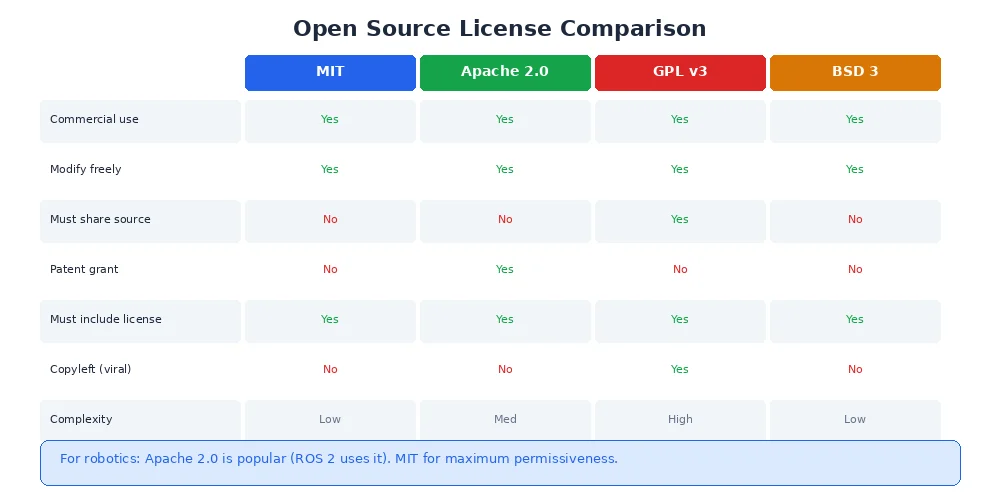
Without a license, your code is legally "all rights reserved" — nobody can use it. Pick an open-source license:
- MIT — permissive, allows commercial use
- Apache 2.0 — permissive, includes patent protection
- GPL — copyleft, requires derived works to also be open source
- BSD — permissive, similar to MIT
For robotics, Apache 2.0 is common. MIT is simpler and more permissive.
2. Write a README
Your README should include:
- What the package does (one-sentence summary)
- Installation instructions
- Quick start example
- Link to documentation
- How to contribute
- License
3. Publish to a Registry
# For Python (PyPI)
python setup.py sdist bdist_wheel
twine upload dist/*

# For Rust (crates.io)
cargo publish

# For other ecosystems, follow their contribution guides
Now anyone can install your package with pip install your-package or cargo add your-package.
Community Norms
Open-source communities thrive on respect and collaboration:
- Be kind — everyone is learning
- Give credit — acknowledge others' work
- Ask questions — but search first (check docs, issues, forums)
- Share knowledge — answer questions, write tutorials
- Respect maintainers' time — they're often volunteers
What's Next?
You've completed Module 9: Build & Share. You now know how to package software, configure and launch systems, test robustly, deploy to real robots, and contribute to the open-source ecosystem.
The robotics community is built on collaboration. Share your work, help others, and keep learning. The next breakthrough might come from code you write or a bug you fix.
Welcome to the community. Let's build the future of robotics together.