Object Detection Basics
Sensors give you raw data — pixels, points, distances. Object detection turns that data into understanding: "There's a person at (2m, 0.5m), a chair at (1m, -1m), and a cup on the table."
This is the bridge between sensing and decision-making.
What Is Object Detection?
Object detection answers two questions simultaneously:
- What is in the image? (classification)
- Where is it? (localization)
The output is a list of detections, each containing:
- Class: "person", "car", "dog", "cup"
- Bounding box: Rectangle around the object (x, y, width, height)
- Confidence score: How certain the detector is (0.0 to 1.0)
# A single frame's detections
detections = [
  {
    "class": "person",
    "confidence": 0.92,
    "bbox": {"x": 120, "y": 50, "width": 80, "height": 200}
  },
  {
    "class": "cup",
    "confidence": 0.78,
    "bbox": {"x": 450, "y": 300, "width": 40, "height": 60}
  },
  {
    "class": "dog",
    "confidence": 0.65,
    "bbox": {"x": 200, "y": 180, "width": 150, "height": 140}
  }
]

# You can filter by confidence:
high_confidence = [d for d in detections if d["confidence"] > 0.80]
# Result: person (0.92), cup (0.78 is below threshold)
# Oops, that filters the cup too. Use 0.75 instead!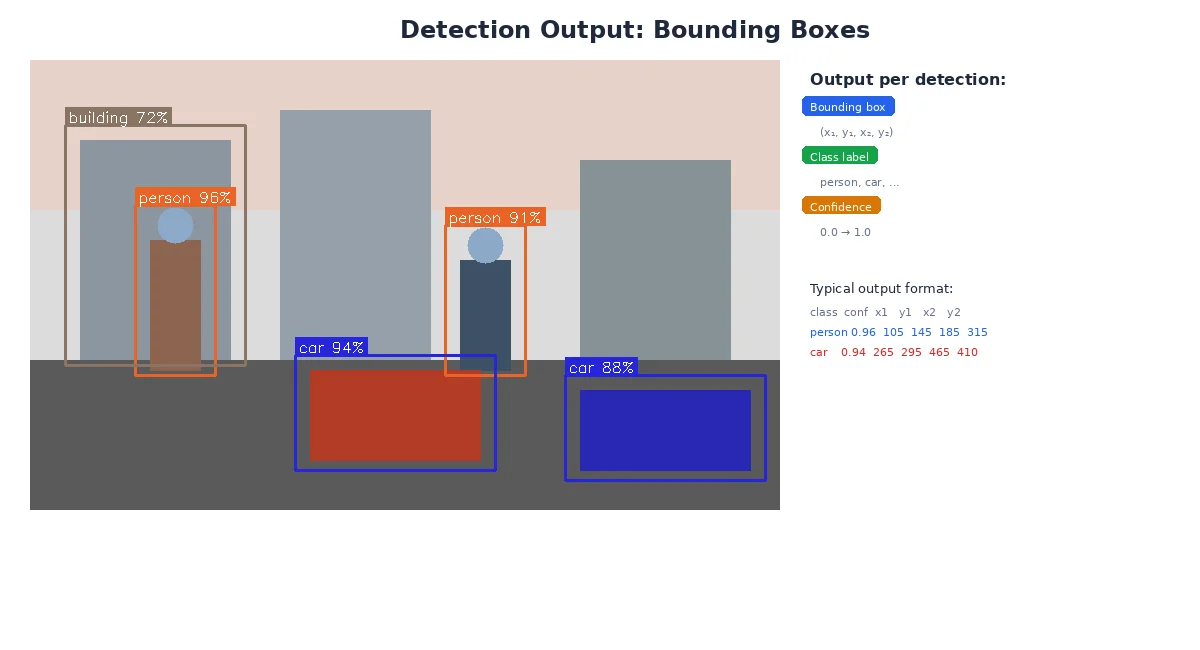
Bounding Boxes
A bounding box is the smallest rectangle that fully contains an object. It's defined by:
- Top-left corner: (x, y) in pixel coordinates
- Size: width and height in pixels
Some formats use:
- (x_min, y_min, x_max, y_max) — two corners
- (x_center, y_center, width, height) — center and size
Bounding boxes are axis-aligned — they can't rotate. For a tilted object (like a book lying diagonally), the bbox includes empty space around it. For tighter fits, use rotated bounding boxes or segmentation masks.
Visualizing Detections
import cv2

# Draw each detection on the image
for det in detections:
    x, y, w, h = det["bbox"].values()
    confidence = det["confidence"]
    label = f'{det["class"]}: {confidence:.2f}'

    # Draw rectangle
    cv2.rectangle(image, (x, y), (x+w, y+h), color=(0, 255, 0), thickness=2)

    # Draw label
    cv2.putText(image, label, (x, y-10), cv2.FONT_HERSHEY_SIMPLEX,
                0.5, (0, 255, 0), 2)

cv2.imshow("Detections", image)
cv2.waitKey(0)
What Machine Learning Does
You could write rules for detection:
- "If there's a red circle, it's a stop sign"
- "If there's a face-shaped blob, it's a person"
But this breaks down fast. What about stop signs in shadows? People wearing masks? Objects partially hidden?
Machine learning learns patterns from thousands of labeled examples:
- Train on 10,000 images of cars from every angle, lighting, weather
- The model learns "car-ness" — shapes, textures, contexts
- It generalizes to new images it's never seen
Popular Object Detection Models
| Model | Speed | Accuracy | Use Case |
|---|---|---|---|
| YOLO (You Only Look Once) | 🚀 Fast | Good | Real-time robotics (30+ FPS) |
| SSD (Single Shot Detector) | Fast | Good | Mobile/embedded devices |
| Faster R-CNN | Slow | Excellent | High-precision tasks (inspection, medical) |
| EfficientDet | Medium | Excellent | Balanced accuracy/speed |
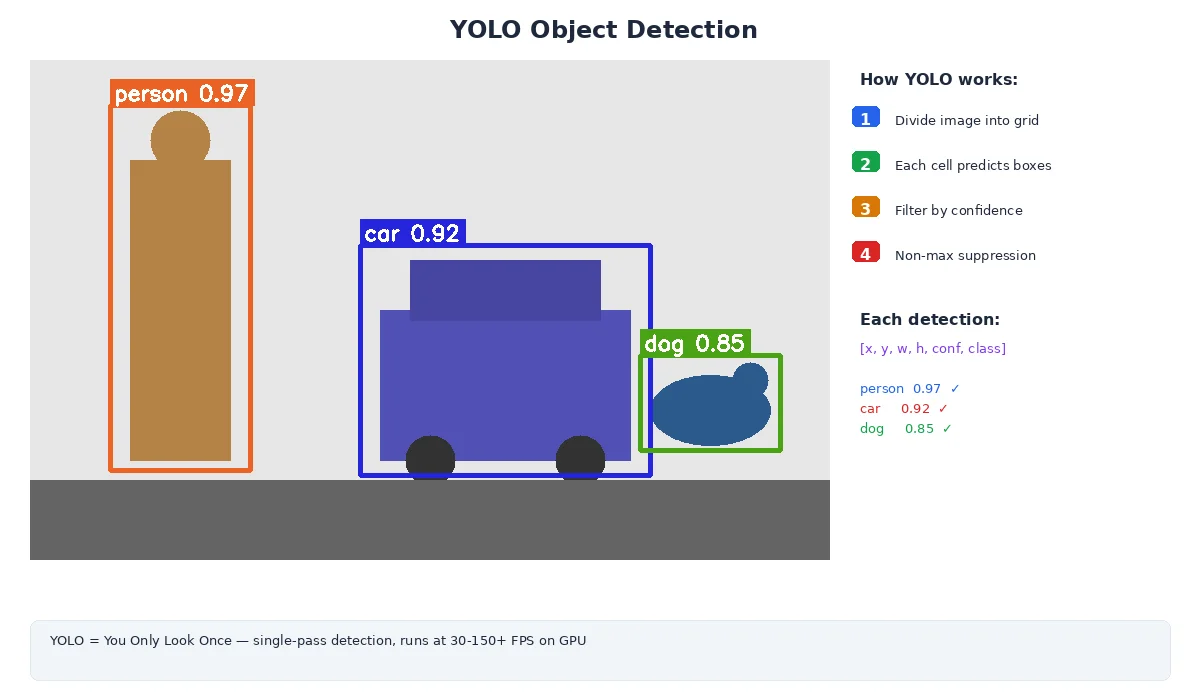
For robots, YOLO is the go-to choice. It's fast enough for real-time video (60+ FPS on a GPU, 10+ FPS on CPU), accurate enough for most tasks, and has tons of pre-trained models available.
Confidence Scores and Thresholds
Every detection has a confidence score — the model's certainty that the detection is correct.
- 0.95: Very confident (almost certainly correct)
- 0.70: Moderately confident (probably correct)
- 0.30: Low confidence (might be a false positive)
You set a threshold to filter detections:
- High threshold (0.8+): Fewer false positives, but might miss real objects
- Low threshold (0.5): Catch more objects, but more false alarms
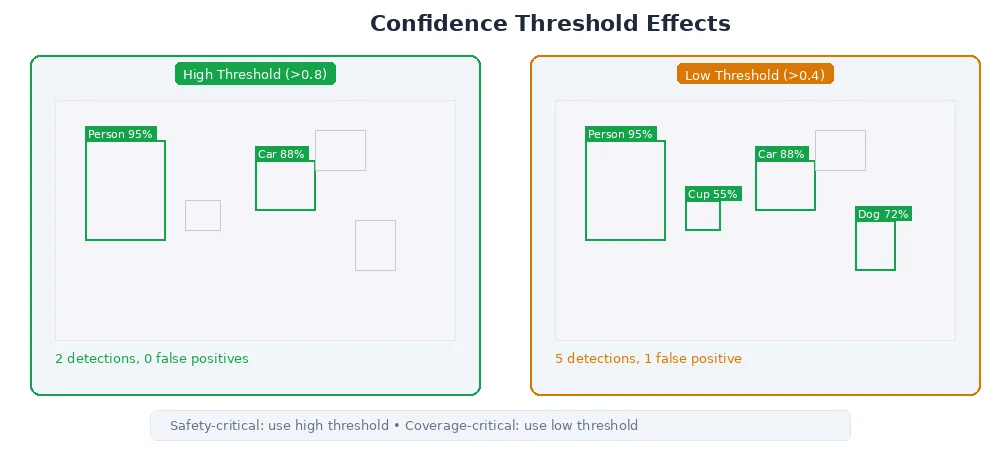
The right threshold depends on your task:
- Picking objects: High threshold (you don't want to grasp empty air)
- Obstacle avoidance: Lower threshold (better to slow down for a false alarm than crash)
# Conservative: only trust very confident detections
confident_detections = [d for d in detections if d["confidence"] > 0.85]

# Aggressive: accept uncertain detections
all_detections = [d for d in detections if d["confidence"] > 0.50]

# Class-specific thresholds (people are critical, decorations aren't)
filtered = []
for d in detections:
    if d["class"] == "person" and d["confidence"] > 0.70:
        filtered.append(d)
    elif d["class"] == "cup" and d["confidence"] > 0.60:
        filtered.append(d)
    # ... other classes
Common Pitfalls
1. False Positives
The model detects something that isn't there:
- Shadow looks like a person
- Reflection in glass triggers a detection
- Pattern on a shirt mistaken for a logo
Fix: Increase confidence threshold, use temporal filtering (require detection in 3+ consecutive frames).
2. False Negatives
The model misses real objects:
- Object partially hidden
- Unusual angle or lighting
- Object not in the training data
Fix: Lower threshold, add more training data, use multiple camera angles.
3. Duplicate Detections
Same object detected twice with overlapping bboxes.
Fix: Apply Non-Maximum Suppression (NMS) — merge overlapping boxes, keep only the highest-confidence one.
What's Next?
Detection gives you objects in the image, but robots need 3D positions to interact with the world. The next lesson covers sensor fusion — combining camera detections with depth data (from LiDAR, stereo, etc.) to localize objects in 3D space.