Time-Varying Transforms
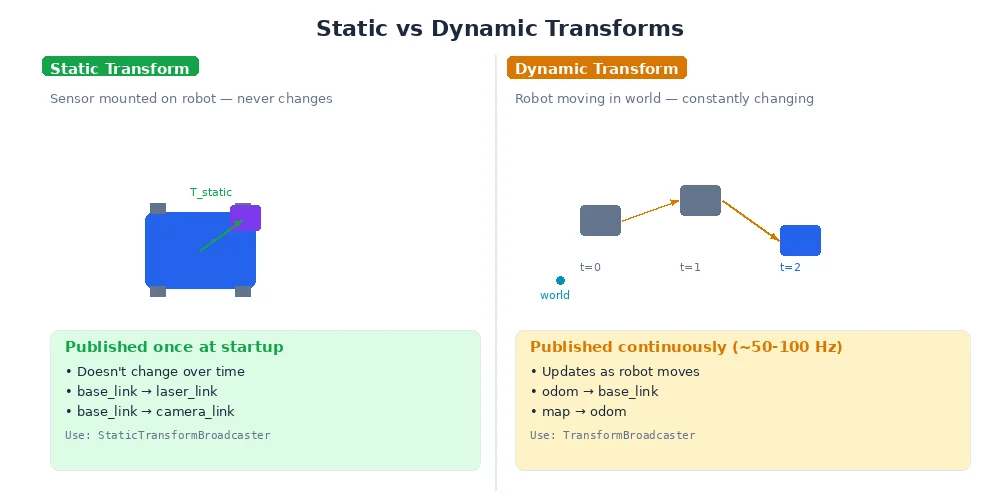
So far, we've treated transforms as static. But real robots move. The camera moves as the robot drives. Arm joints rotate. The world frame stays fixed, but almost everything else shifts continuously.
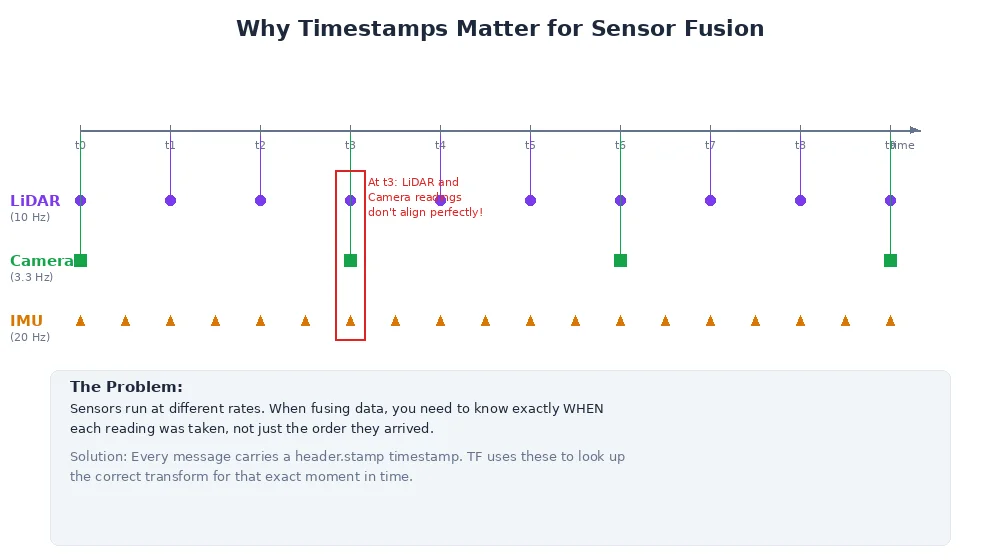
This raises a critical question: when you transform a measurement, which moment in time are you using?
The Problem
Imagine this scenario:
- At t=0.0s, the camera sees a ball at position (1, 0, 0) in camera frame
- At t=0.0s, the robot is at position (2, 0, 0) in world frame
- The camera publishes its observation at t=0.02s (20ms later)
- By t=0.02s, the robot has moved to position (2.1, 0, 0)
Question: When you transform the ball's position from camera frame to world frame, do you use the robot's position at t=0.0s (when the camera saw it) or t=0.02s (when the message arrived)?
Answer: Always use the timestamp of the measurement — t=0.0s. The ball was observed when the robot was at (2, 0, 0), so that's the transform we need.
This is why every sensor message in robotics includes a timestamp field. It's not optional — it's fundamental to correct coordinate transforms.
Time-Stamped Transforms
Modern transform systems don't just store transforms — they store time-stamped transform histories.
import time

# Robot starts at origin
tf_buffer.set_transform("world", "base_link",
                        translation=(0, 0, 0),
                        rotation=(0, 0, 0),
                        timestamp=0.0)

# Robot moves forward at 0.5 m/s
for t in range(0, 100):
    position = (0.5 * t, 0, 0)
    tf_buffer.set_transform("world", "base_link",
                            translation=position,
                            rotation=(0, 0, 0),
                            timestamp=float(t))
    time.sleep(1)

# Now the buffer has 100 transforms for base_link, one per second
When you query a transform, you specify a timestamp:
# Look up where the robot was at t=5.0s
T = tf_buffer.lookup_transform("world", "base_link", time=5.0)
# Returns: translation=(2.5, 0, 0)

# Look up where the robot was at t=37.0s
T = tf_buffer.lookup_transform("world", "base_link", time=37.0)
# Returns: translation=(18.5, 0, 0)
This lets you transform sensor data using the robot's position at the moment the sensor captured the data, even if you're processing it later.
Transform Buffers
A transform buffer (also called a TF buffer) is a data structure that:
- Stores recent transform histories for all frames
- Discards old transforms (typically keeps 10-30 seconds)
- Interpolates between stored transforms when you query an in-between time
Why discard old transforms? Memory. A robot with 50 frames, each publishing at 100Hz, generates 5,000 transforms per second. Storing hours of history would consume gigabytes. Most use cases only need the recent past.
Buffer Configuration
Typical settings:
# Create a buffer that keeps 10 seconds of history
tf_buffer = TransformBuffer(cache_time=10.0)

# Alternatively, specify per-frame retention
tf_buffer.set_cache_time("high_frequency_camera", 2.0)   # Keep 2s
tf_buffer.set_cache_time("slow_imu", 30.0)               # Keep 30s
Interpolation
What if you query a timestamp that's between two stored transforms?
Example:
- Transform at t=1.0s: position (1, 0, 0)
- Transform at t=2.0s: position (2, 0, 0)
- Query: what was the position at t=1.7s?
The buffer interpolates:
- Linear interpolation for translation:
(1, 0, 0) + 0.7 * ((2, 0, 0) - (1, 0, 0)) = (1.7, 0, 0) - SLERP for rotation (see Lesson 4): smoothly blend between the two orientations
# Stored transforms
tf_buffer.set_transform("world", "base_link",
                        translation=(1, 0, 0),
                        rotation=quat_from_euler(0, 0, 0),
                        timestamp=1.0)

tf_buffer.set_transform("world", "base_link",
                        translation=(2, 0, 0),
                        rotation=quat_from_euler(0, 0, 45),  # 45° yaw
                        timestamp=2.0)

# Query in between
T = tf_buffer.lookup_transform("world", "base_link", time=1.7)
# Returns:
#   translation ≈ (1.7, 0, 0)
#   rotation ≈ 31.5° yaw (70% of the way from 0° to 45°)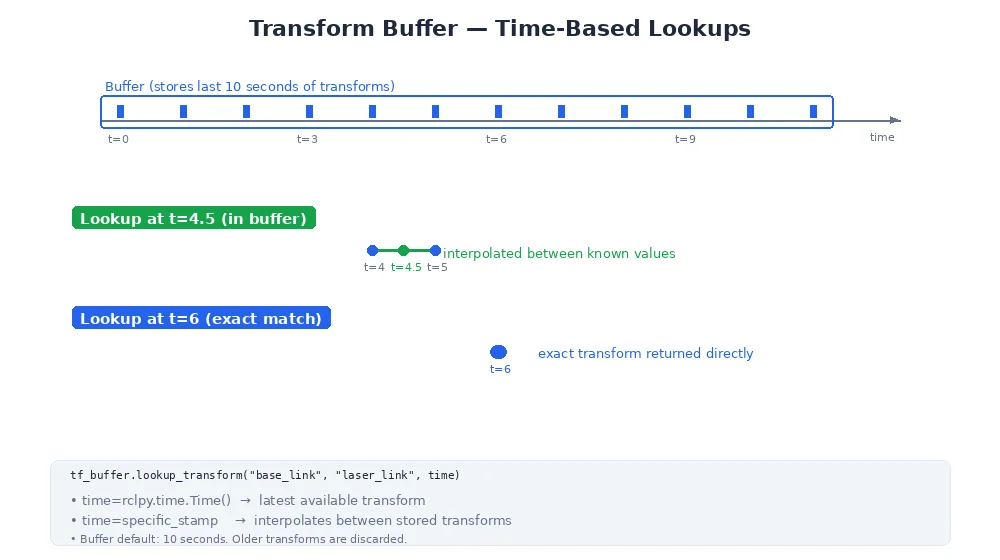
This is crucial for sensor fusion. A camera at 30Hz and a LiDAR at 10Hz don't align perfectly. Interpolation lets you get the robot's pose at the exact moment each sensor captured data.
Handling Missing Transforms
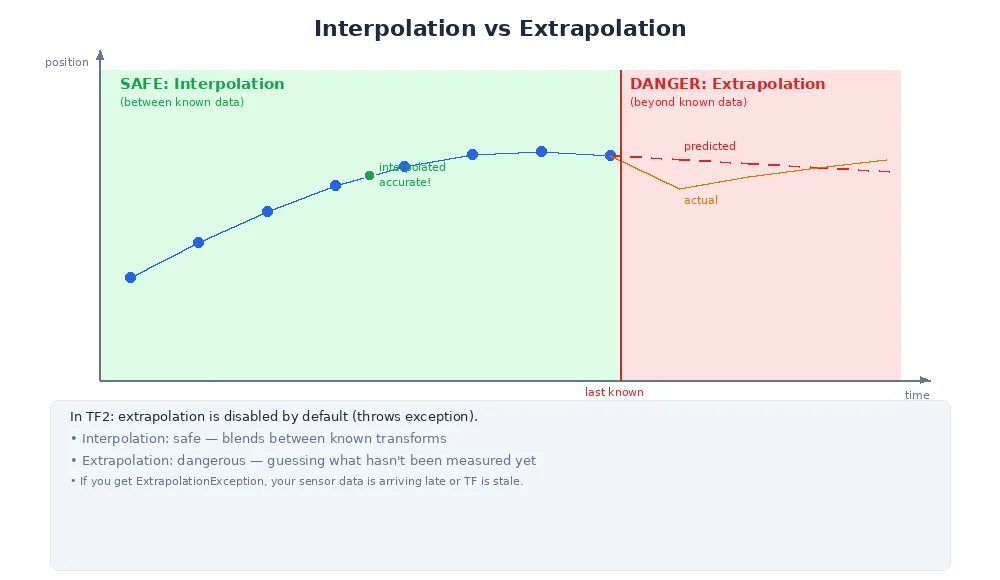
What if you query a timestamp that's outside the buffer's range?
- Too old: The buffer purged it. You'll get an error: "Transform too old."
- Too new: The transform hasn't been published yet. You'll get an error: "Transform from the future."
Best practices:
1. Wait for transforms to arrive
# Wait up to 1 second for the transform to be available
try:
    T = tf_buffer.lookup_transform("world", "camera",
                                   time=t,
                                   timeout=1.0)
except TransformException as e:
    print(f"Transform not available: {e}")
2. Use "latest available"
# Use the most recent transform, whatever time it is
T = tf_buffer.lookup_transform("world", "camera", time=Time.now())
3. Extrapolation (use with caution)
Some systems allow extrapolating into the future (predicting where the robot will be). This is dangerous — predictions are often wrong. Prefer interpolation between known values.
Real-World Example: Fusing Camera and LiDAR
A self-driving car has:
- Camera at 30Hz → images at t=0.0, 0.033, 0.066, ...
- LiDAR at 10Hz → scans at t=0.0, 0.1, 0.2, ...
At t=0.15s, you want to fuse a camera image (captured at t=0.132s) and a LiDAR scan (captured at t=0.1s).
# Camera detected object at (1, 0, 0) in camera frame at t=0.132
T_camera = tf_buffer.lookup_transform("world", "camera", time=0.132)
object_world_from_camera = T_camera.apply((1, 0, 0))

# LiDAR detected obstacle at (2, 0.5, 0) in lidar frame at t=0.1
T_lidar = tf_buffer.lookup_transform("world", "lidar", time=0.1)
object_world_from_lidar = T_lidar.apply((2, 0.5, 0))

# Both are now in world frame, but using the correct historical transforms
# You can fuse them despite different timestamps
Without time-stamped transforms, the fused data would be misaligned — the robot moved between the two measurements.
What's Next?
You've now learned the full coordinate frame system — from basic frames to transforms to time-varying histories. This is the foundation of robot perception and control.
In the next module, we'll move up a level: from 'where am I?' to 'how do I get there?' — the world of motion planning and control.