Transforms
You know what coordinate frames are. Now for the magic: how do we convert a position in one frame to a position in another frame?
The answer is transforms — a combination of translation (moving) and rotation (turning) that maps coordinates from one frame to another.
The Two Components
Every transform has exactly two parts:
1. Translation (Moving the Origin)
Moving from one frame's origin to another's. If the camera is 20cm forward and 10cm up from the robot's base, that's a translation of (0.2, 0, 0.1).
2. Rotation (Turning the Axes)
Rotating the axes to align with the target frame. If the camera points 30° downward, that's a rotation.
Key insight: Translation and rotation happen in a specific order. Rotate first, then translate. This matters because rotation happens around the origin — if you translate first, you change where the origin is, and your rotation will be around the wrong point.
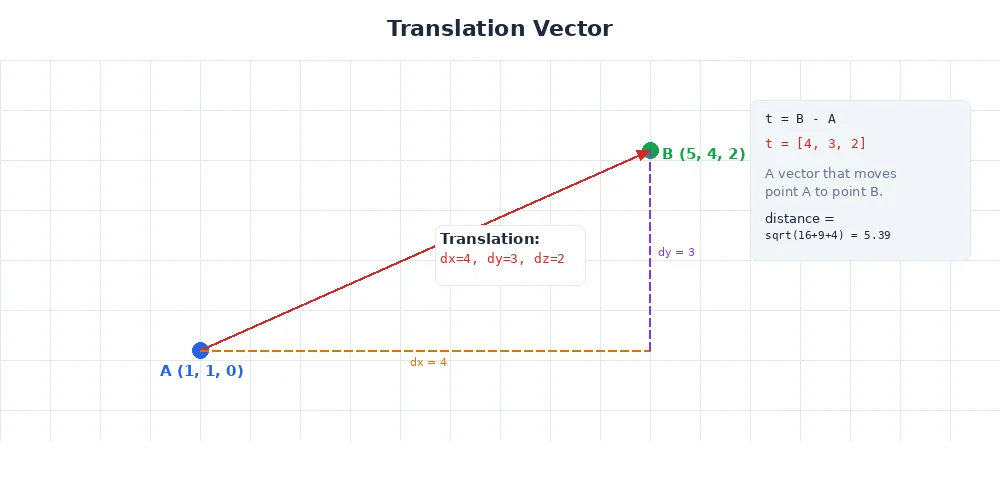
Pure Translation
Let's start simple. Imagine the camera is 50cm forward (X), 10cm left (Y), and 30cm up (Z) from the base. No rotation — both frames point the same direction.
A point at position p_camera = (1, 0, 0) in camera frame means "1 meter ahead of the camera." To convert to base frame:
p_base = p_camera + translation
p_base = (1, 0, 0) + (0.5, 0.1, 0.3)
p_base = (1.5, 0.1, 0.3)
That's it. Add the translation vector.
import numpy as np

# Camera is 50cm forward, 10cm left, 30cm up from base
translation = np.array([0.5, 0.1, 0.3])

# Object at (1, 0, 0) in camera frame
p_camera = np.array([1.0, 0.0, 0.0])

# Transform to base frame
p_base = p_camera + translation
print(p_base)  # [1.5, 0.1, 0.3]
Pure Rotation
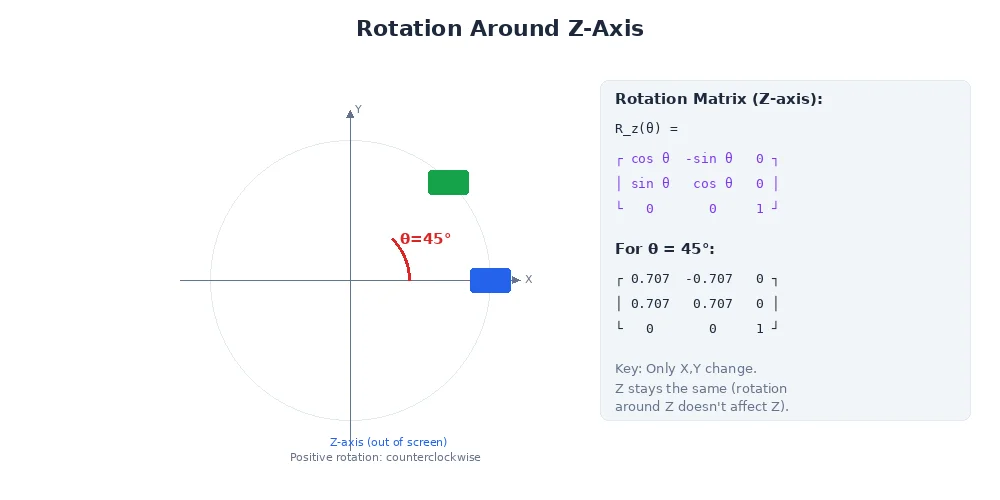
Now the camera is at the same position as the base, but it's rotated 90° to the left (around the Z-axis). An object directly ahead of the camera is actually to the left of the base.
Rotation uses a rotation matrix — a 3×3 matrix that transforms vectors.
import numpy as np

# Rotation matrix for 90° left (around Z)
# X_new = -Y_old
# Y_new = X_old
# Z_new = Z_old
R = np.array([
    [0, -1, 0],   # New X = -old Y
    [1,  0, 0],   # New Y = old X
    [0,  0, 1]    # New Z = old Z
])

# Object at (1, 0, 0) in camera frame (forward)
p_camera = np.array([1.0, 0.0, 0.0])

# Rotate to base frame
p_base = R @ p_camera  # Matrix multiplication
print(p_base)  # [0.0, 1.0, 0.0] — left in base frame!
The camera sees the object "forward" (X=1), but in the base frame, it's actually "left" (Y=1). That's rotation at work.
The Full Transform: Rotation + Translation
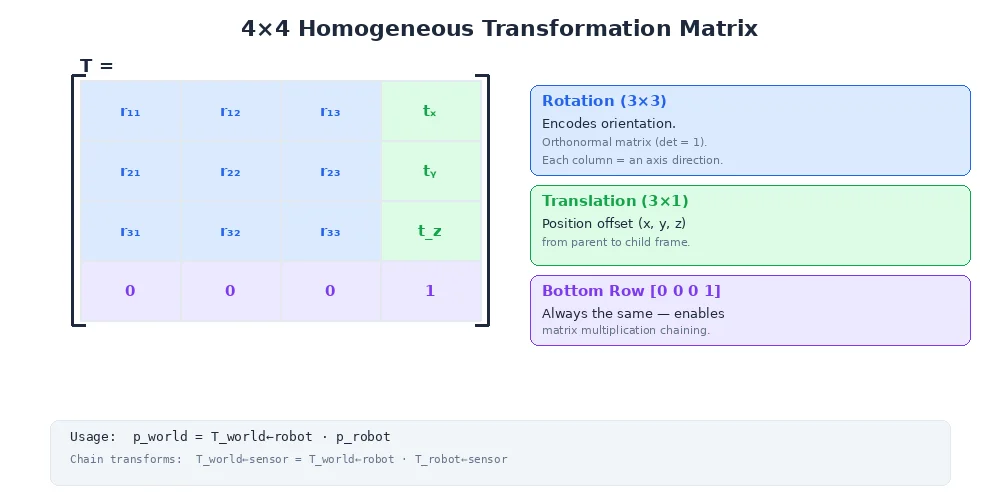
In reality, most frames are both translated and rotated. The full formula:
p_target = R * p_source + tWhere:
Ris the 3×3 rotation matrixtis the 3×1 translation vectorp_sourceis the position in the source framep_targetis the position in the target frame
import numpy as np

# Camera is rotated 90° left AND 50cm forward from base
R = np.array([
    [0, -1, 0],
    [1,  0, 0],
    [0,  0, 1]
])
t = np.array([0.5, 0.0, 0.0])

# Object at (1, 0, 0.5) in camera frame
p_camera = np.array([1.0, 0.0, 0.5])

# Transform to base frame
p_base = R @ p_camera + t
print(p_base)  # [0.5, 1.0, 0.5]
The object is 1m ahead of the camera (which points left in base frame) and 50cm above the ground. In base frame: 50cm forward, 1m left, 50cm up.
Rotation Matrices
You don't usually write rotation matrices by hand. Instead, you use angles:
Rotation around Z-axis (yaw — turning left/right)
R_z(θ) = [cos(θ)  -sin(θ)  0]
         [sin(θ)   cos(θ)  0]
         [0        0       1]
Rotation around Y-axis (pitch — tilting up/down)
R_y(θ) = [cos(θ)   0  sin(θ)]
         [0        1  0     ]
         [-sin(θ)  0  cos(θ)]
Rotation around X-axis (roll — tilting left/right)
R_x(θ) = [1  0        0      ]
         [0  cos(θ)  -sin(θ) ]
         [0  sin(θ)   cos(θ) ]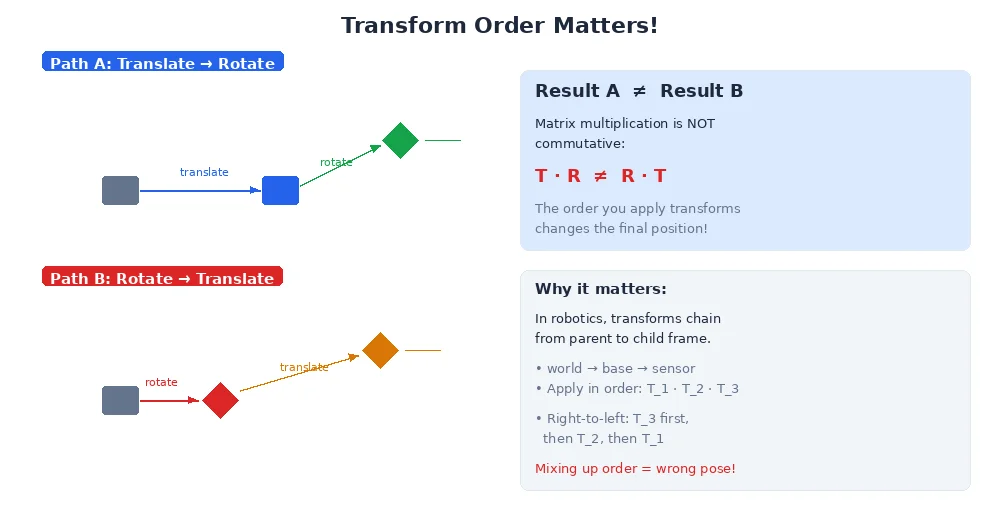
If you need to rotate around multiple axes (e.g., yaw 30°, then pitch 20°), you multiply the matrices. But order matters! R_y * R_z is different from R_z * R_y. We'll cover this — and a better solution (quaternions) — in Lesson 4.
Combining Transforms
Transforms compose. If you know:
- Transform from
cameratohead - Transform from
headtobase
You can compute the transform from camera to base by multiplying them.
# Camera → Head
R_head_camera = ...
t_head_camera = ...

# Head → Base
R_base_head = ...
t_base_head = ...

# Camera → Base (combined)
R_base_camera = R_base_head @ R_head_camera
t_base_camera = R_base_head @ t_head_camera + t_base_head

# Now transform any point directly from camera to base
p_base = R_base_camera @ p_camera + t_base_camera
This is why frame trees are so powerful. You define small, local transforms (camera relative to head, head relative to base), and the system automatically computes any frame-to-frame transform you need.
Inverse Transforms
Going from camera to base is one direction. What about going backward — from base to camera?
The inverse transform:
R_inverse = R^T  (transpose of the rotation matrix)
t_inverse = -R^T * t# Forward: camera → base
R_base_camera = ...
t_base_camera = ...
# Backward: base → camera
R_camera_base = R_base_camera.T
t_camera_base = -R_camera_base @ t_base_camera
# Transform a point from base to camera frame
p_camera = R_camera_base @ p_base + t_camera_baseWhat's Next?
You've learned how individual transforms work. In the next lesson, we'll see how to organize dozens of frames into a transform tree — the data structure that makes real robot coordinate systems manageable.