Behavior Trees
A behavior tree (BT) is a hierarchical structure for organizing behavior. Unlike state machines (which focus on states), behavior trees focus on tasks.
The Core Idea
A behavior tree is a tree of nodes. Each frame, you tick the tree — starting at the root and flowing down to the leaves. Each node returns one of three statuses:
- SUCCESS — the task completed successfully
- FAILURE — the task failed
- RUNNING — the task is still in progress
Nodes are composed in a hierarchy, and the result propagates up from child to parent.
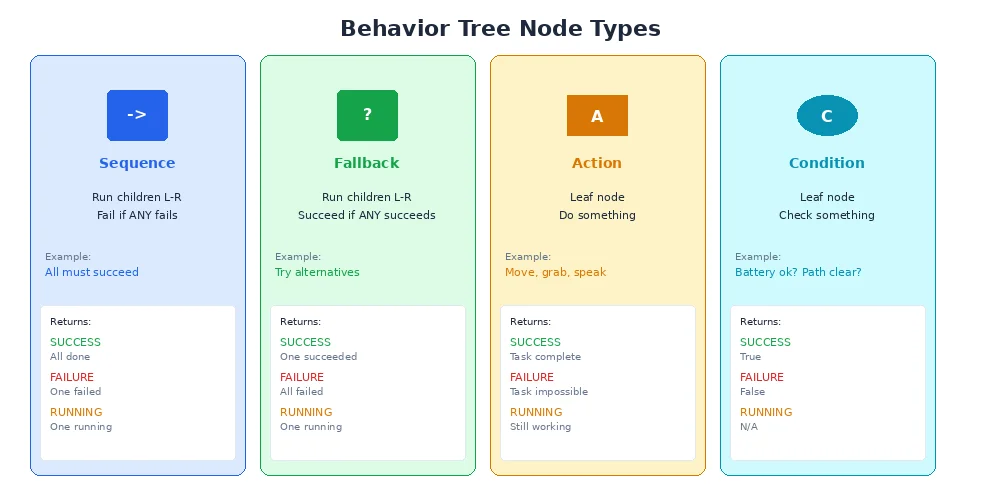
The Four Node Types
1. Sequences (AND logic)
A sequence node runs its children in order. If any child returns FAILURE, the sequence stops and returns FAILURE. If all children return SUCCESS, the sequence returns SUCCESS.
Sequence: [Approach Door, Open Door, Enter Room]This is like saying: "Do A, then B, then C. If any step fails, the whole thing fails."
2. Selectors (OR logic)
A selector node tries its children in order until one succeeds. If a child returns SUCCESS, the selector stops and returns SUCCESS. If all children return FAILURE, the selector returns FAILURE.
Selector: [Use Main Entrance, Use Side Door, Use Emergency Exit]This is like saying: "Try A. If that fails, try B. If that fails, try C."
3. Conditions
A condition node checks a boolean and immediately returns SUCCESS or FAILURE. Examples:
IsBatteryLow?IsPathClear?HasMission?
Conditions are the "leaves" that read sensor data or check internal state.
4. Actions
An action node performs a task. Examples:
MoveToGoal(returnsRUNNINGwhile moving,SUCCESSwhen reached,FAILUREif stuck)OpenGripper(returnsSUCCESSwhen opened)PublishStatus(returnsSUCCESSimmediately)
Actions are the "leaves" that make the robot do something.
Example: Patrol and Charge
Let's build a behavior tree for a patrol robot that charges when low on battery.
How it works:
- Every frame, we tick the root (a selector).
- The selector tries the first child: "Handle Low Battery" sequence.
- Condition:
IsBatteryLow?- If battery is high → returns
FAILURE - If battery is low → returns
SUCCESS
- If battery is high → returns
- If battery is low, the sequence continues to
FindCharger, thenDockAndCharge. - If the whole sequence succeeds, the selector returns
SUCCESS(and stops — no patrolling this frame).
- Condition:
- If "Handle Low Battery" returns
FAILURE(battery is fine), the selector tries the second child: "Patrol".MoveToNextWaypoint→ returnsRUNNINGwhile moving,SUCCESSwhen reached.ScanForIntruders→ returnsSUCCESSafter scanning.

The key insight: battery handling has higher priority because it's the first child of the selector. If battery is low, patrol never runs.
Behavior trees were originally developed for video game AI (think NPCs in Halo or The Sims). They've since become popular in robotics because they're easy to author, visualize, and reuse.
Decorators
A decorator wraps a child node and modifies its behavior. Common decorators:
| Decorator | Behavior |
|---|---|
| Inverter | Flips SUCCESS ↔ FAILURE |
| Repeater | Runs child N times or until failure |
| RetryUntilSuccess | Keeps retrying child until it succeeds |
| Timeout | Returns FAILURE if child takes too long |
| ForceSuccess | Always returns SUCCESS (useful for "try but don't care if it fails") |
Example using an inverter:
The inverter flips the result of IsPathClear?. So if the path is blocked, the condition returns FAILURE, which the inverter flips to SUCCESS, allowing the sequence to proceed to StopAndReplan.
Parallel Nodes
Some behavior tree implementations include parallel nodes that tick multiple children simultaneously (not sequentially).
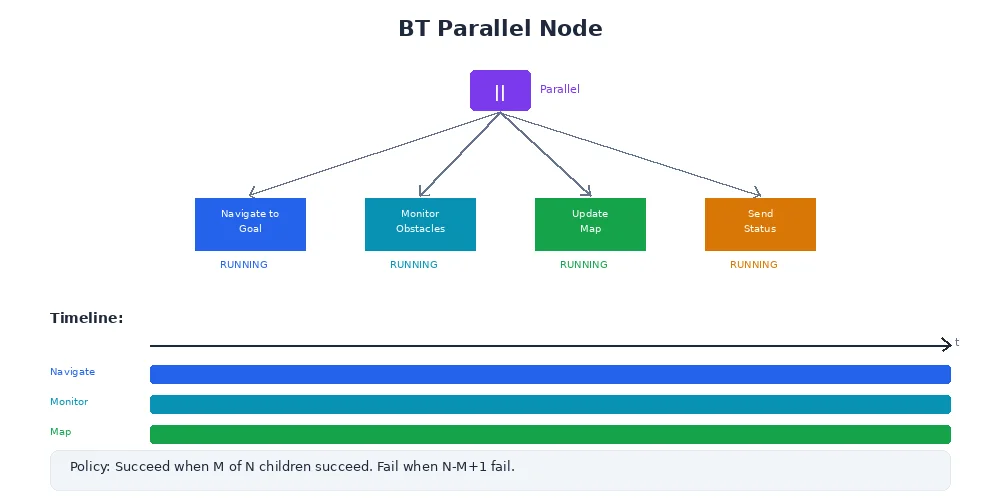
This runs all three tasks in parallel. The parallel node succeeds if at least 2 of 3 children succeed.
"Parallel" in behavior trees doesn't mean multi-threading. It means all children are ticked in the same frame and their results are combined. The tasks still run sequentially at the code level — they just all get a chance to execute.
Ticking: The Execution Model
Unlike state machines (which react to events), behavior trees are polled. You call tree.tick() at a fixed rate (e.g., 10 Hz), and the tree evaluates from the root.
class Robot:
    def __init__(self):
        self.bt = build_behavior_tree()

    def run(self):
        rate = 10  # Hz
        while True:
            status = self.bt.tick()
            if status == SUCCESS:
                print("Mission complete!")
                break
            elif status == FAILURE:
                print("Mission failed.")
                break
            # RUNNING means keep going
            sleep(1.0 / rate)
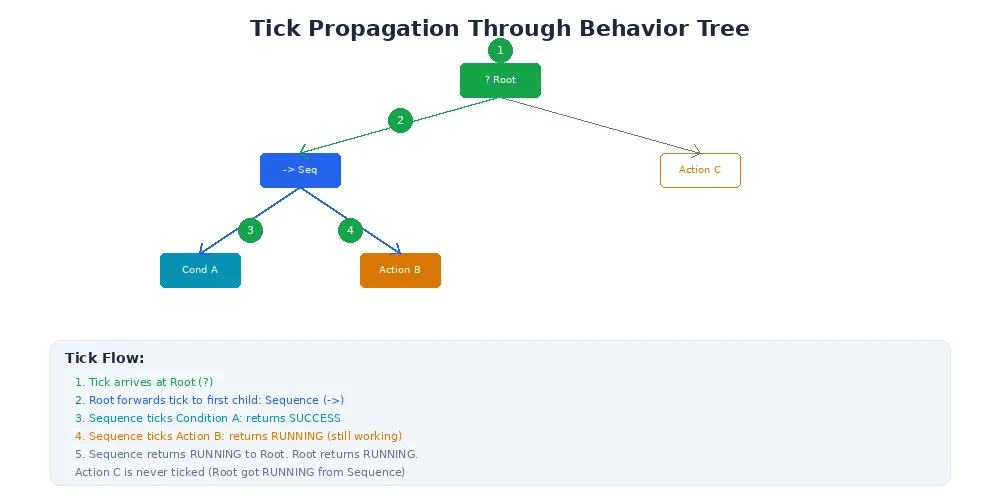
Each tick, the tree re-evaluates from scratch. This makes BTs reactive — if a condition changes (e.g., battery suddenly drops), the tree adapts on the next tick.
When Behavior Trees Excel
Behavior trees are ideal when:
- You have many small, composable behaviors (search, approach, grasp, retreat)
- Behaviors need to run in parallel or be prioritized (high-priority tasks try first)
- You want to visualize and edit behavior in a GUI (game engines and robot frameworks offer visual BT editors)
- You want to reuse subtrees (the "avoid obstacle" subtree can be used in many contexts)
They're less ideal when:
- You have a small number of discrete modes (use a state machine)
- Transitions need to be event-driven rather than polled
- Performance is critical (ticking every frame has overhead)
What's Next?
Now you know both state machines and behavior trees. But when should you use each? In the next lesson, we'll compare the two and discuss trade-offs for different robot tasks.